
Calculating DLS targets
8 July 2026
(updated 1/9/2026)
In Queensland Premier Cricket, 2-day matches where the first day is abandoned (ie., no play) due to weather, are played on Day 2 as an “Unscheduled One Day” fixture. For a variety of reasons, PlayHQ fixtures are not converted to a one-day format. As a result, there is no DLS calculation available on the e-scoring platform. What to do?
PlayCricket has a DLS Calculator (introduced late in the 2025/26 season; version 6.0 as of April 2026) which can be found at this: LINK
The calculator can be used on Laptop or tablet and also allows download of DLS Par tables in pdf format. Printers may not always be available at games, but pdf could be opened and photos taken by Team Managers/Captains to help track DLS Par scores.
A couple of examples on the use of the PlayCricket DLS Calculator are shown below as well as other options available.
PlayCricket DLS Calculator - Example 1
50 over Match. Start delayed due to wet conditions on Day 2. Reduced to 36 overs per side at the start.
Team A First innings interrupted for 15 minutes at 29.2 overs; Score 3/209;
A further 2 overs lost; 34 per side. Final score at 34 overs 6/253.
Team B Target (to win) calculated at 262 from 34 overs.
Team B innings ended for Bad Light at 5:09pm; 16.1 overs bowled; score 6/98
Par Score 183; Team A won by 85 runs DLS Method
Using the scenario described above.
Enter first innings details. then tap/click on “Generate Target”:
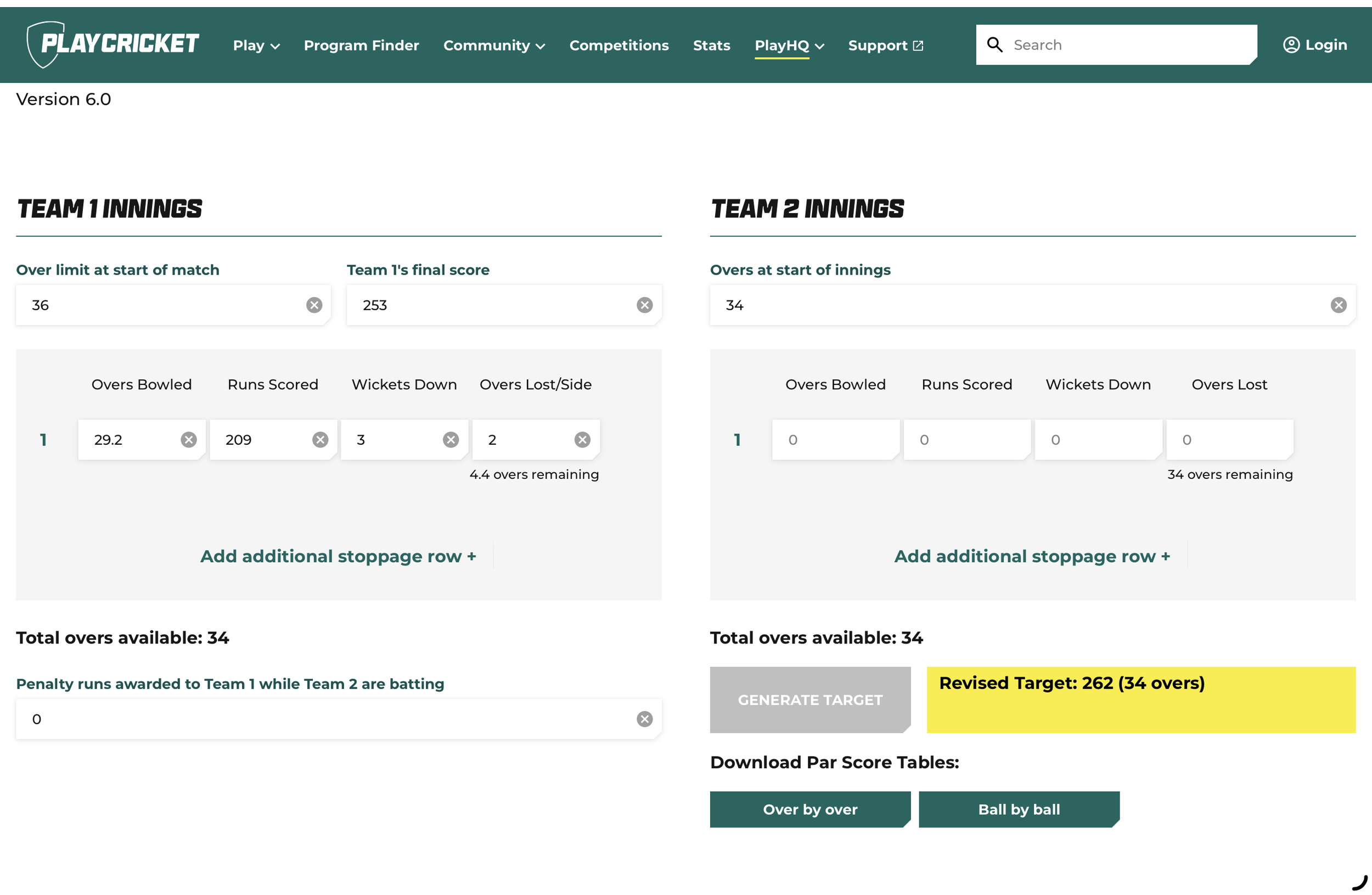
Team B’s target is higher than Team A’s first innings, because Team A’s innings was interrupted late and they lost access to two of the 6.4 overs. With 7 wickets in hand they may have scored significantly in the lost overs.
The adjusted target is impacted by when the stoppage occurs, the number of wickets lost and number of overs lost. For example:
if Team A were 8 wickets down instead of 2 when the stoppage occurred, the revised target is 247.
if the stoppage occurred at 19.2 with the score 3/137, the revised target is 254.
You might like to try these two scenarios for yourself.
Tap/Click on the Download Par Scores “Ball by Ball” button to see par scores which Team B is required to achieve if rain interrupts again.
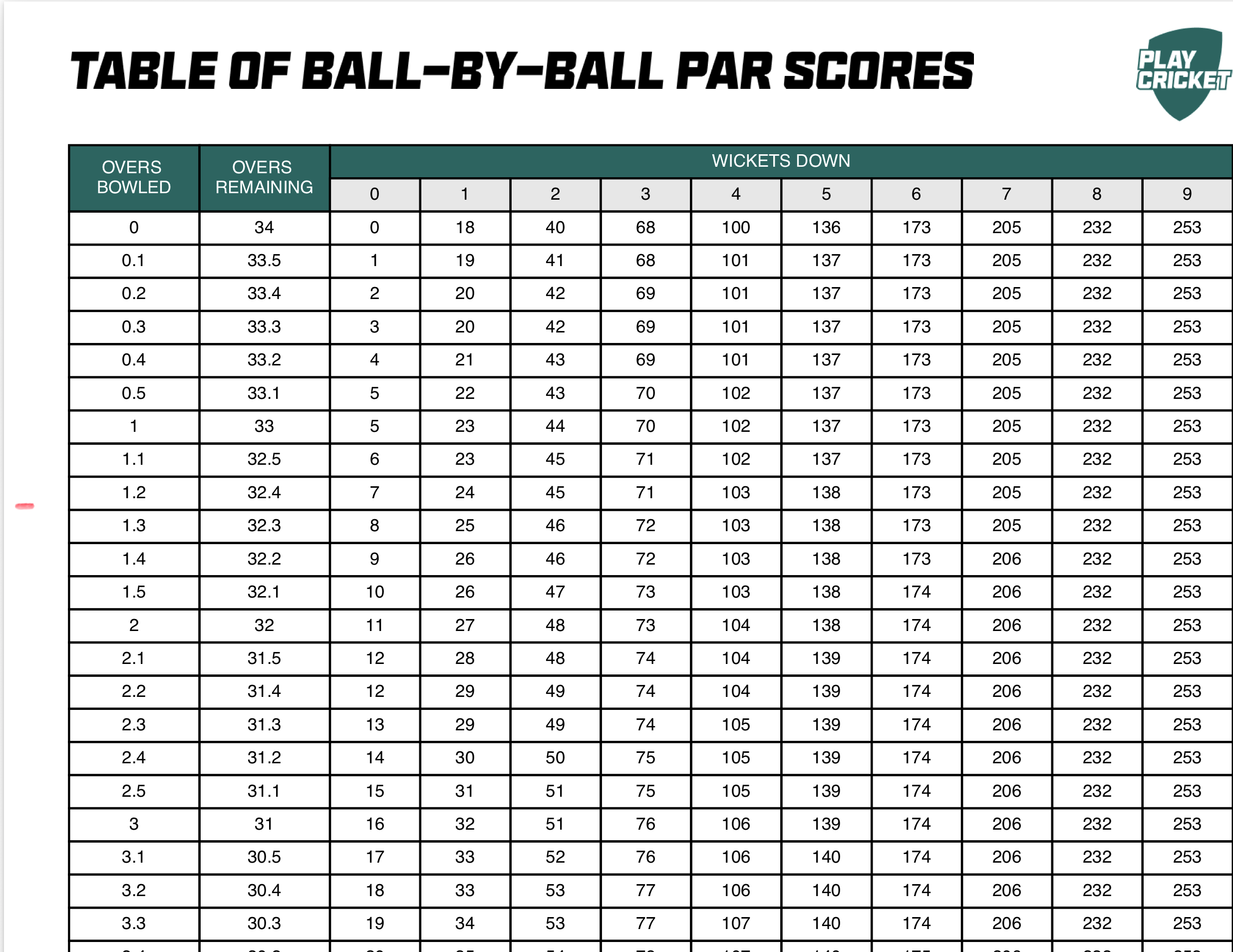
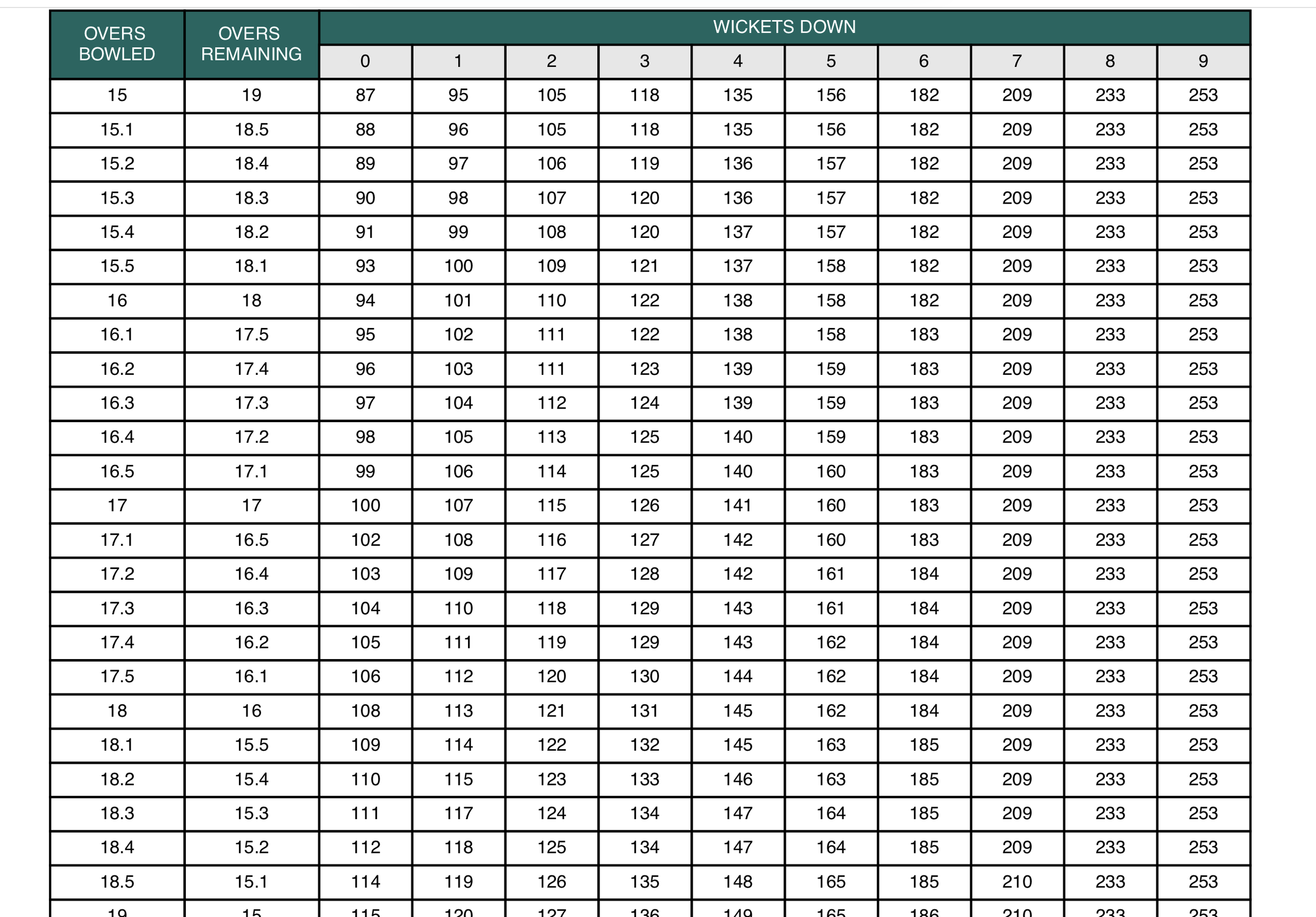
The Ball-by-Ball table shows that at the 16.1 over mark, with 6 wickets down, Team B’s Par Score was 183. At 6/98 Team B is 85 runs behind.
With no further play possible. Team A wins the match by 85 runs DLS Method.
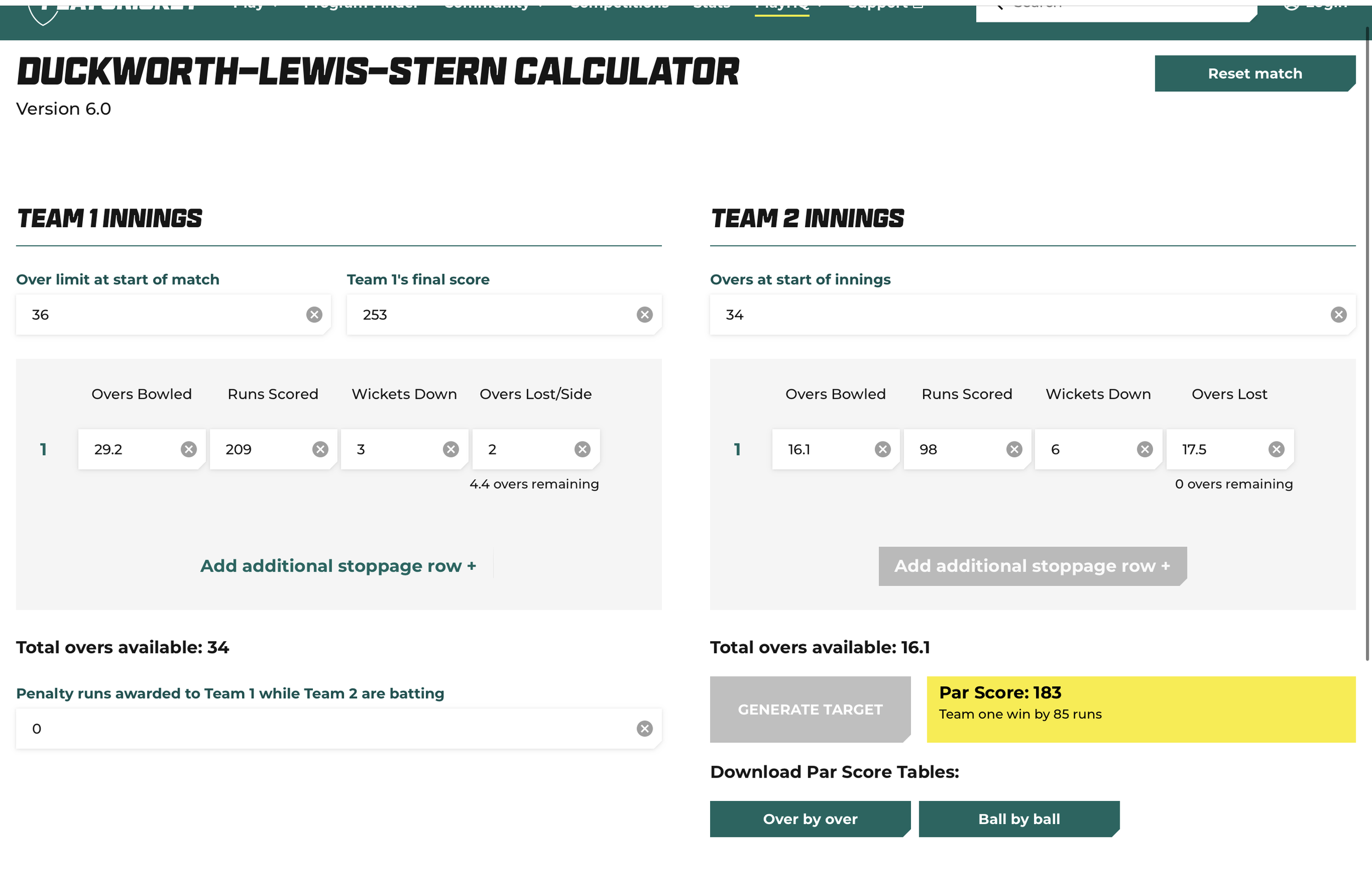
Input the final interruption, then click/tap on “Generate Target” to confirm the result.
PlayCricket DLS Calculator - Example 2
20 over Match. Play starts on schedule.
Team A First innings interrupted 3.2 overs; Score 0/34;
3 overs lost; 17 per side. Final score at 17 overs 6/160.
Team B Target (to win) calculated at 163 from 17 overs.
Team B score 151 Par Score 162; Team A won by 11 runs DLS Method
Using the scenario described above.
Enter first innings details. then tap/click on “Generate Target”:
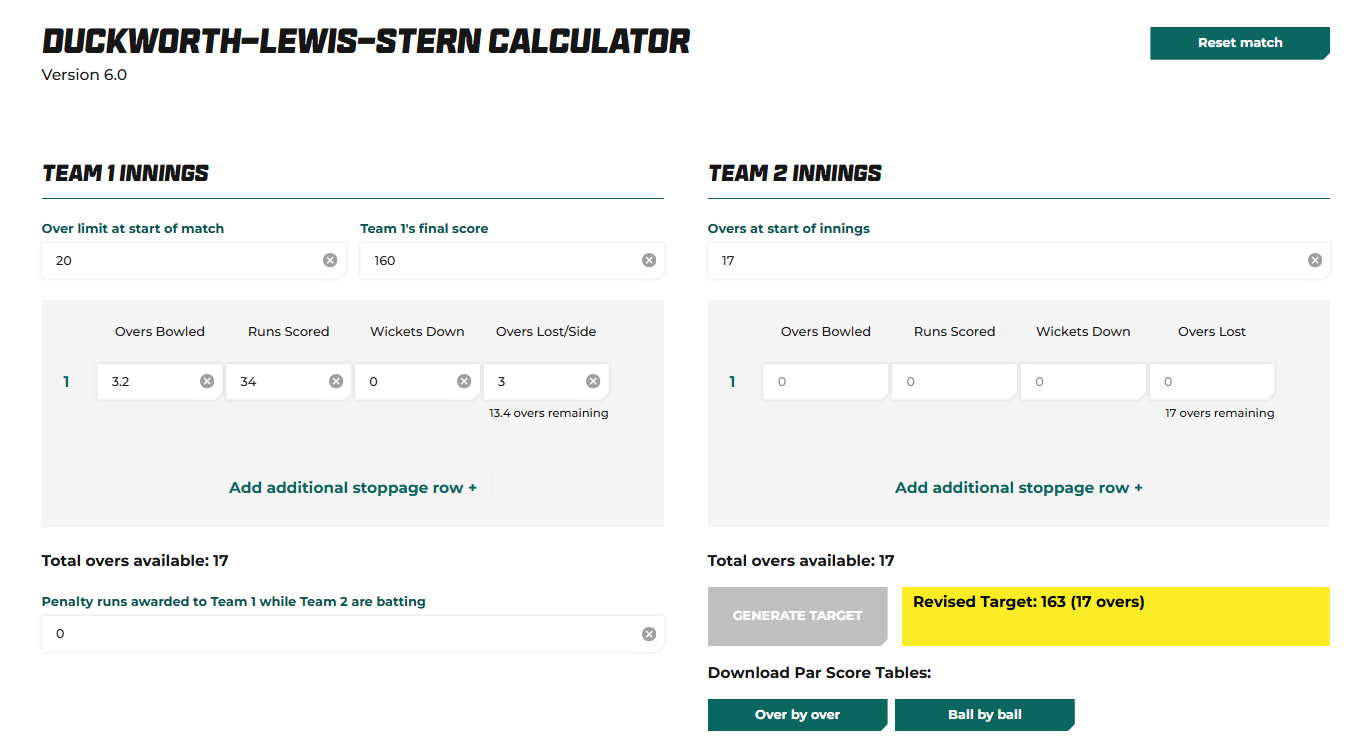
Team A lost access to 3 overs, but because this occurred early in the innings, Team A has the opportunity to adapt to the lost overs, so the revised target is only slightly higher than Team A’s total.
If the stoppage occurred at 13.2 with the score 3/122, the revised target would have been 169
If rain stopped play at the 17 over mark with the score 6/160 and no further play was possible for the first innings, the revised target would have been 173. This higher target is because Team A would have been expecting to face another 3 overs, but did not have access to them.
The ICC DLS Calculator
Where possible DLS targets should be calculated using the official version of the ICC DLS Calculator available on the Queensland Cricket web site Resources page.
Note that the link on this page downloads a “.jar” file which does not readily open on iPad or other mobile devices. The “.jar” file runs on some laptops/PCs where Java has been installed, however, in some cases, intervention is required to run the file and the calculator. A Youtube video entitled “How to open Java files in Windows - Run .JAR Files by Techhut provides instruction on running the ‘jar” file.
The following outlines the steps for use of the calculator using the scenario above. Note that the calculations below show DLS version 5.0.
Steps:
Run the Calculator
Click on “other match types”
Drop down to “Custom (user-chosen overs/innings and min. overs/side values)”. OK
Input scheduled overs per side (eg., 50 for grades 1 and 2). OK
input minimum overs for a game (eg., 15 for grades 1 and 2). OK
The calculator opens…
input the No of overs at start of play (ie., 36)
Input Team 1’s interruptions. (ie., 29.2 overs, 3/209, 2 additional vers lost)
Target calculates
Click on Create Par Score tables (ball-by-ball)
input Team 2 interruptions (ie., 16.1 overs, 6/98, “a” for abandon)


Other Options
Another alternative to the ICC calculator can be found on the National Cricket Association sites for countries such as Singapore and Norway. These Calculators will work on mobile devices.
Input is similar to the ICC DLS calculator and target calculations are consistent with the ICC DLS Calculator.


Other calculators
NV Play scoring software contains a very robust DLS calculation in line with approved ICC calculations.
nxCricket HD displays a DLS par, but the calculation is currently not in line with current ICC calculations.
Note: The opinions and representations expressed herein are solely that of the writer and do not represent the opinions of any club/association with which the writer is affiliated.